


Airtel is one of the leading telecommunication providers in Nigeria. They have different tariff plans for all their subscribers. Each Airtel tariff plan has its own peculiar benefit. However, if you don’t know your tariff plan and, to worsen the situation, you don’t even know how to check, well, there is no cause for alarm; we get you covered.
Checking the Airtel tariff plan is quite simple and pretty easy since there are a number of ways that you can do that, ranging from using a code, the Airtel mobile app, and the Airtel self-care portal. These methods are very easy to navigate; hence anyone can easily check theirs using any of the methods.
Knowing your Airtel tariff plan is very important because it will help you to know your current tariff plan and the benefits that it has. Once you know it, you will be able to know the best ways to maximise the plan and the benefits that come with it.
How to Check Your Tariff Plan on Airtel
There are different methods that you can use to check your current tariff plan on Airtel. The methods are using a code, the Airtel mobile app, or using the Airtel Self-Care Centre. These methods are simple and straightforward to use. Let’s discuss them in detail.
How to Check My Tariff Plan on Airtel Code
The code that you can use to check your tariff plan on Airtel is *121#. It is not difficult to use this code. Follow the steps below to use *121# to check your Airtel tariff plan.
1. Dial *121# on your phone dialler.
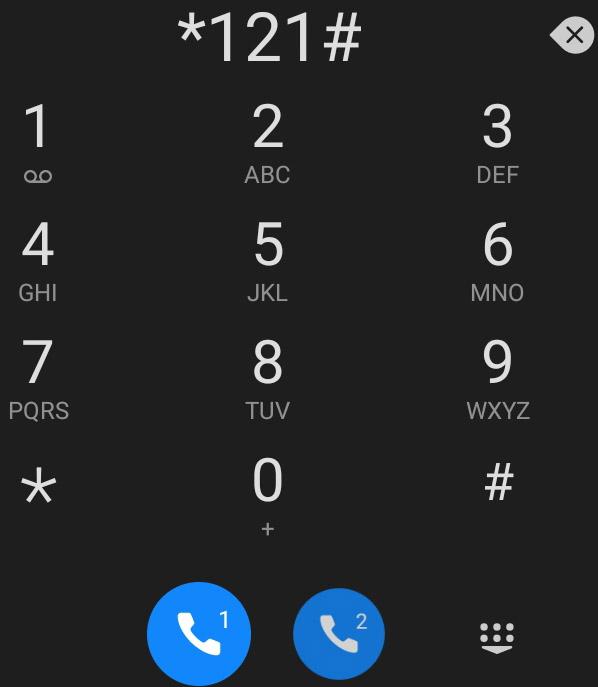
2. Choose the ‘’Manage my Account” option, which is option 2.
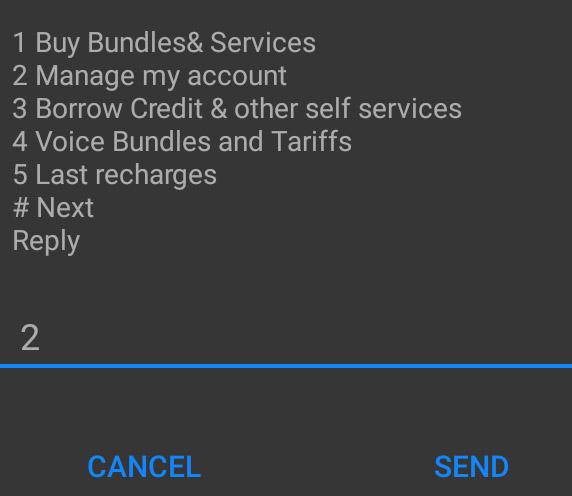
3. Select option 5, which is ‘’My Tariff Plan.
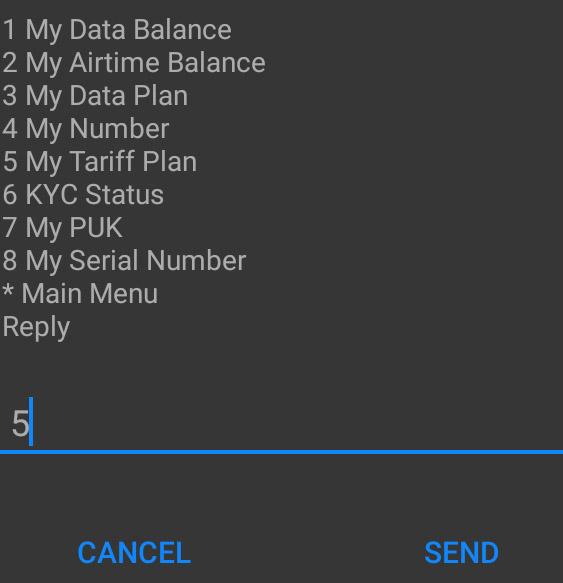
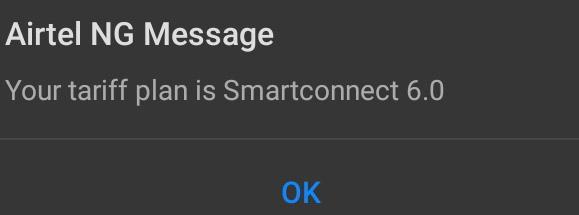
4. Finally, your Airtel tariff plan will display on your phone screen.
How to Check Your Tariff Plan on the Airtel App
You can also check your current tariff plan on the Airtel network by using their mobile app. Airtel has a mobile application that allows their subscribers to perform different functions, including checking their tariff plan. To use this method, follow the few steps below:
- Visit Google Play Store or Apple App Store to download the Airtel mobile app for Android and iOS users, respectively.
- Sign in to your Airtel account if you have an existing account or create a new one using your details.
- Once signed, locate the “My Account” section within the app.
- Once you click on it, you will be able to see your current Airtel tariff plan, and that’s all.
How to check your Airtel tariff plan via the Airtel Self-Care Portal
In addition to code and the Airtel mobile app, you can also check your tariff plan using the Airtel SelfCare portal. However, before you can use this method, you are required to have an internet connection, unlike checking it using code, where you don’t need it. Follow the simple steps below to check your tariff plan using the Airtel SelfCare portal.
- Open any browser on your phone.
- Go to selfcare.airtel.com.ng.
- Log in to your Airtel account using your phone number and passcode.
Meanwhile, if you don’t have an account yet, you can create one by tapping on the “Register Now” button within the app and following the onscreen instructions carefully.
- Navigate to the “My Account” section within the web
- Choose the “My Tariff Plan” option.
- Lastly, your Airtel tariff plan will display on your phone.
List of Airtel tariff plans
There are many Airtel tariff plans for subscribers. They are listed below:
- Premier Connect
- SmartPREMIER
- SmartVALUE
- SmartTrybe
- SmartTALK 2.0
- SmartRecharge
- SmartConnect (New SIM)
- TalkMore Bundle
- Airtel 6X Bundles
- SmartTrybe Junior
Conclusion
There are different methods that you can use to check your Airtel tariff plan, such as using a code, a mobile app, or through their self-care portal. These methods are very easy to use. So, you can check your Airtel tariff plan using any of these methods to enable you to maximise the benefits that come with your tariff plan.


No Comments Yet